Home / Lifestyle / Health & Fitness / Article /
Gadget comparison: Xolo Chromebook vs Nexian Chromebook
Updated On: 12 June, 2015 08:00 AM IST | | Hassan M Kamal
Nexian and Xolo seem to have opened up a new segment for Google’s infamous Chromebooks, but do these budget devices available within 13K deserve your attention? Hassan M Kamal finds out





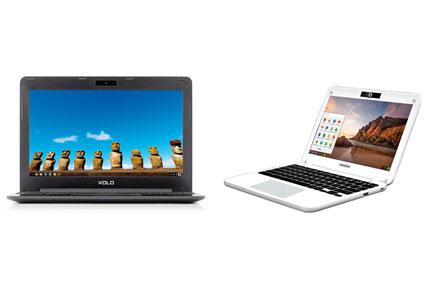
Xolo Chromebook and Nexian Chromebook
Xolo Chromebook
Design: The Xolo Chromebook is a mixed bag of good and bad design statements. It starts well with the exterior shell — the matte finish and sleek edges evoke a premium feel to it — but the interiors (the keyboard base) in spite of a glass-like finish is a bit disappointing. We feel, it was done purposely to help one visually identify the keyboard. However, the sleek edges draw attention from onlookers.
Rating: 7/10

Display: The Xolo Chromebook gets a 11.6-inch TFT display with a resolution of 1368x768. The viewing angles are limited, and the colours are a tad washed out during video playback, but it’s sufficient to fulfill most needs. We recommend video
playback at maximum brightness for optimal results.
Rating: 7/10
Hardware: The Xolo Chromebook is powered by Rockchip RK3288 SoC featuring Quad-Core Cortex-A17 processors upto 1.8GHz and 2GB RAM. The CPU performs well in most tasks including browsing as well as photo editing. The device plays HD (720p) and Full HD (1080p) videos with ease too, though we aren’t quite satisfied with the colours. The built-in storage is a 16GB EMMC, out of which nearly 9.1 GB is available for local storage. Though, you can’t store all files in the Chromebook, it should suffice most of your needs. There’s a MicroSD card slot (upto 32GB) for those wanting to expand the internal storage. The 4,200 mAh battery lasts a good nine hours. As for connectivity, it comes with Wi-Fi 802.11 b/g/n, Bluetooth, HDMI, two USB 2.0 ports. The speakers are a bit disappointing as the sound output is very low, thus also limiting its usage for video chats. The 1MP front camera works well only in well-lit environments. It weighs heavy nearly 1.2kg for 11.6-inch laptop.
Rating: 8/10
Keyboard: One of the main reasons behind opting for a laptop is the keyboard, unfortunately, Xolo does a bad job of meeting that need. Not only are the keys difficult to navigate through, but they often get stuck in their positions, making typing a painful experience. Besides, the Chrome OS keyboard is different, hence requires a bit of practice. Knowledge of common Chrome OS short keys comes handy.
Rating: 4/10
Trending Stories
Latest Photos
Latest Videos
Latest Web Stories
ADVERTISEMENT

Ganeshotsav 2026

ADVERTISEMENT